> ## Documentation Index
> Fetch the complete documentation index at: https://docs.eclipseproxy.com/llms.txt
> Use this file to discover all available pages before exploring further.
# Proxy Checker
> Free tool to test whether your proxies work against any URL: paste a list, get pass/fail results per proxy
The **[Proxy Checker](https://www.eclipseproxy.com/tools/proxy-checker)** validates proxies against any target URL to identify working and failing connections. Free, no signup required.
[https://www.eclipseproxy.com/tools/proxy-checker](https://www.eclipseproxy.com/tools/proxy-checker)
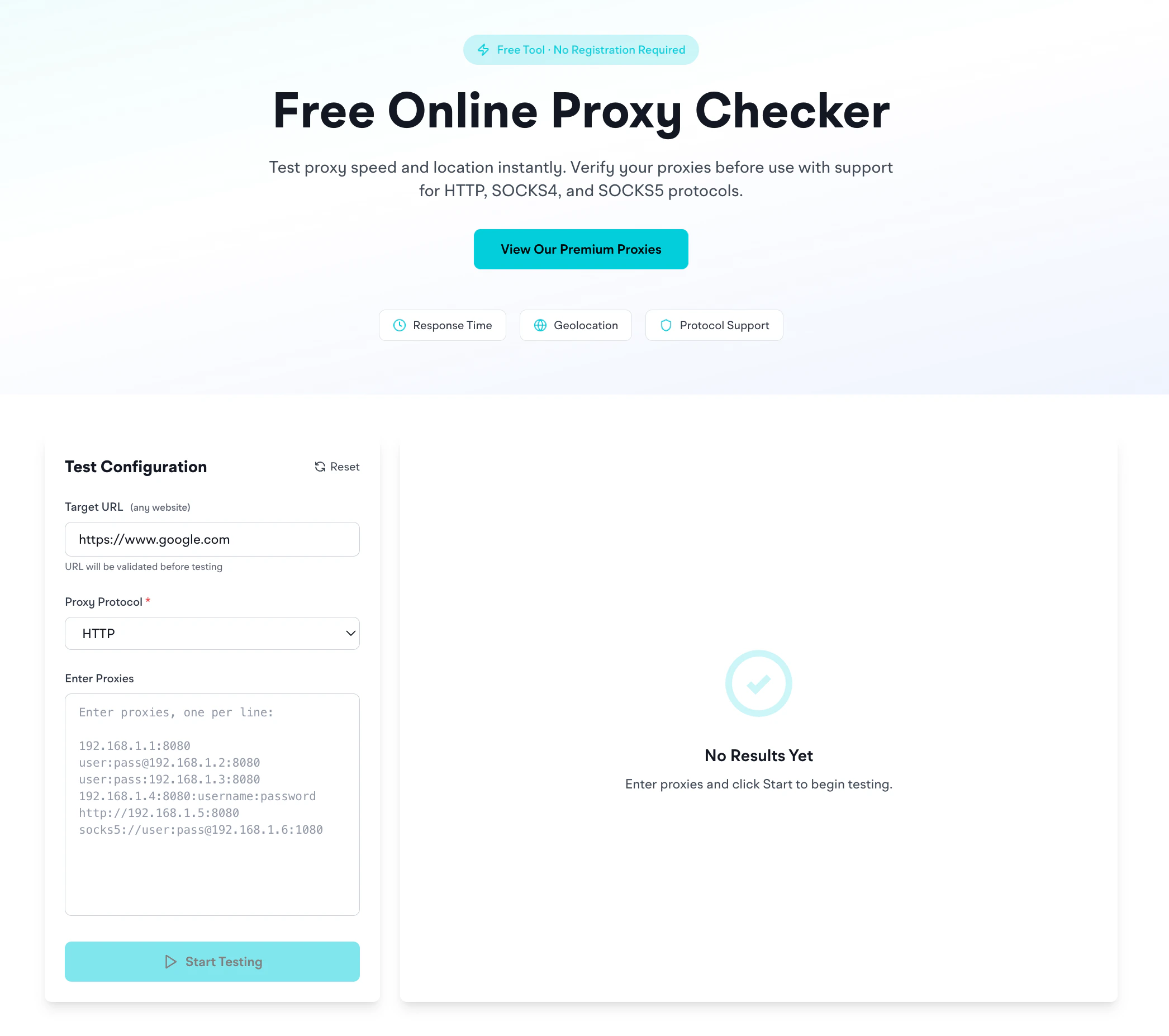 ## What it does
1. You paste in one or more proxies (any format: see below)
2. You pick a target URL (any website)
3. You pick a protocol (HTTP or SOCKS5)
4. It connects through each proxy to the target and reports success or failure
Use cases:
* Verify EclipseProxy proxies reach your target
* Validate proxies from any provider before deployment
* Diagnose connectivity issues
* Filter proxy lists to identify working connections for specific targets
## Supported proxy formats
The checker auto-detects most common formats:
```
192.168.1.1:8080
user:pass@192.168.1.2:8080
user:pass:192.168.1.3:8080
192.168.1.4:8080:username:password
http://192.168.1.5:8080
socks5://user:pass@192.168.1.6:1080
```
Paste one per line. Mixing formats is fine: the checker normalizes them.
## Choosing a target URL
* **`https://www.google.com`**: default; tests basic reachability
* **`https://api.ipify.org`**: returns the proxy's exit IP, good for verifying geo-routing
* **`https://ipinfo.io`**: returns full geolocation info as JSON
* **Your actual target**: best test. If you're scraping `example.com`, check against `example.com`.
A proxy that passes Google may still fail on a Cloudflare-protected target. Always check against your real target before committing.
## How to read results
* **Success** = proxy connected to the target and got an HTTP response
* **Failure** = connection refused, timeout, auth error, or target returned an error code
* **Slow** = the proxy worked but took longer than normal (useful to spot degraded IPs)
## Common reasons proxies fail this test
* **Wrong protocol**: using HTTP credentials on a SOCKS5 endpoint or vice versa. Switch the dropdown. See [HTTP vs SOCKS5](/setup/generating).
* **Expired credentials**: the proxy account ran out of bandwidth or the proxy password was reset
* **Restricted destination**: target is on EclipseProxy's restricted list. See [Restricted destinations](/getting-started/policies#restricted-destinations).
## Privacy
Credentials are processed through our backend only for the duration of the test and are not stored. As with all proxy tools, avoid pasting production credentials into untrusted checkers.
## Related
* [Proxy Formatter](/tools/proxy-formatter): convert proxies between formats before testing
* [IP Geolocation](/tools/ip-geolocation): once a proxy passes the checker, look up where its IP is located
* [Common errors](/errors/codes): what each failure message means
## What it does
1. You paste in one or more proxies (any format: see below)
2. You pick a target URL (any website)
3. You pick a protocol (HTTP or SOCKS5)
4. It connects through each proxy to the target and reports success or failure
Use cases:
* Verify EclipseProxy proxies reach your target
* Validate proxies from any provider before deployment
* Diagnose connectivity issues
* Filter proxy lists to identify working connections for specific targets
## Supported proxy formats
The checker auto-detects most common formats:
```
192.168.1.1:8080
user:pass@192.168.1.2:8080
user:pass:192.168.1.3:8080
192.168.1.4:8080:username:password
http://192.168.1.5:8080
socks5://user:pass@192.168.1.6:1080
```
Paste one per line. Mixing formats is fine: the checker normalizes them.
## Choosing a target URL
* **`https://www.google.com`**: default; tests basic reachability
* **`https://api.ipify.org`**: returns the proxy's exit IP, good for verifying geo-routing
* **`https://ipinfo.io`**: returns full geolocation info as JSON
* **Your actual target**: best test. If you're scraping `example.com`, check against `example.com`.
A proxy that passes Google may still fail on a Cloudflare-protected target. Always check against your real target before committing.
## How to read results
* **Success** = proxy connected to the target and got an HTTP response
* **Failure** = connection refused, timeout, auth error, or target returned an error code
* **Slow** = the proxy worked but took longer than normal (useful to spot degraded IPs)
## Common reasons proxies fail this test
* **Wrong protocol**: using HTTP credentials on a SOCKS5 endpoint or vice versa. Switch the dropdown. See [HTTP vs SOCKS5](/setup/generating).
* **Expired credentials**: the proxy account ran out of bandwidth or the proxy password was reset
* **Restricted destination**: target is on EclipseProxy's restricted list. See [Restricted destinations](/getting-started/policies#restricted-destinations).
## Privacy
Credentials are processed through our backend only for the duration of the test and are not stored. As with all proxy tools, avoid pasting production credentials into untrusted checkers.
## Related
* [Proxy Formatter](/tools/proxy-formatter): convert proxies between formats before testing
* [IP Geolocation](/tools/ip-geolocation): once a proxy passes the checker, look up where its IP is located
* [Common errors](/errors/codes): what each failure message means